
Import to Grid
1 Things to know before importing data
•The import option is available for some grids.
•However, since there are special cases for such tables, the relevant help title should be consulted.
•It is essential to be sensitive about data consistency and accurate data.
•The data security in the files to be uploaded to the system must be provided by the user and these operations must be conducted.
•Files should not be uploaded from unsafe sources.
2 File Type and Pattern to be Imported
•File Types:
oxlsx (Excel) or
oxml
•File Pattern
oA specific file pattern is determined for each table. For this reason, it is necessary to refer to the relevant table and/or help title.
3 Why is there no Import option for each grid?
•Some data needs to be imported.
•Depending on the customer's request, the system manufacturer decides which data should be imported.
•This decision; is taken depending on the size, sensitivity, and frequency of the data and the period of recording the data in question.
4 How can i imported?
•There is the relevant grid with the Import option.
•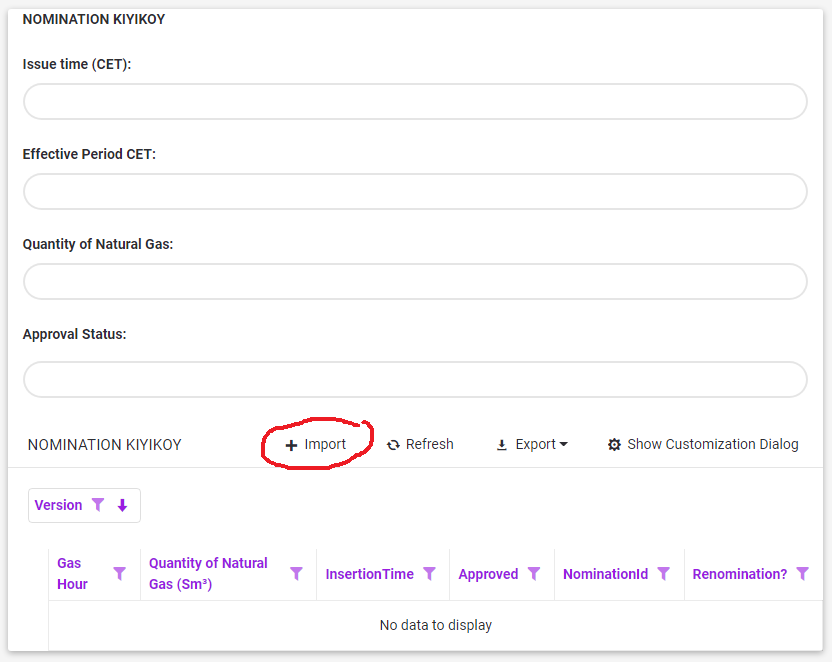
•Press the "Import"  button on the upper band of this grid.
•The file is loaded by making the appropriate selection in the fields in the window that opens. (Browse and Upload)
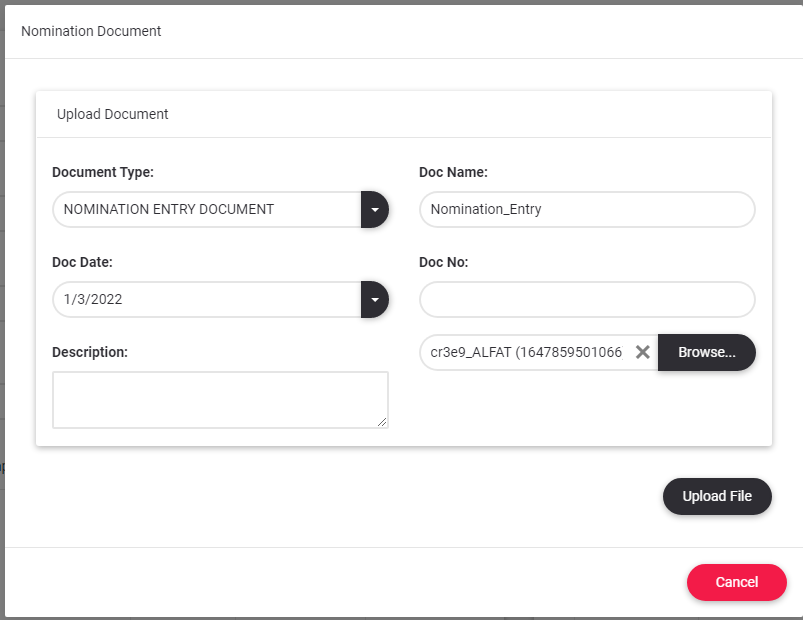
•If an error occurs, the system will report it.
•Attention! Please act in accordance with the safety and related department rules.