Header
General

The "Header Bar" is the section that is displayed on Master Page hence all the pages. The elements in it contain the functions that the user will constantly need during the operation of the system. We will examine these elements in turn below.
Logo (Default Page)
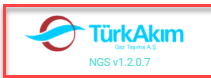
Show what the system is and its version. Also, if the user clicks on this logo, it goes to the default page.
If the NavBar is hidden, the "Logo" will be invisible. For the logo to be displayed again, the NavBar must be set to the Show position.
Navigation Bar (Hide-Show)

Collapse or open the "Header" to the left provides functions to close or open the NavBar.
This button is in the On position on wide screens, off position on mobile and narrow screens. The user can change his status by clicking this button.
User Info (Account)
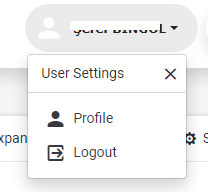
The username is displayed in the right pane of the Header. It is used to access the settings of the user logged into the system. Clicking on it will display "Profile" and "Exit" Buttons.
If the profile button is clicked, a pop-up with information about the user account opens. (See Profile Pop-Up)
If the Exit button is clicked, the system exits.
Messages

It is the button used to access the user's in-system messages. The numbers displayed above the button are the number of unread messages.
Alarms

It is the button used to display the notification and alarms presented by the system for the user. The numbers displayed above the button are the number of unread alarms.
Shift Info

It is the button that allows showing the information about the shifts as a pop-up.
Support&Decision

It is the button that shows the reports in the Support & Decision Module.